
Häfele Connect3.7.5 - Google Play
You'll be able to see results in few seconds.
Publisher Description
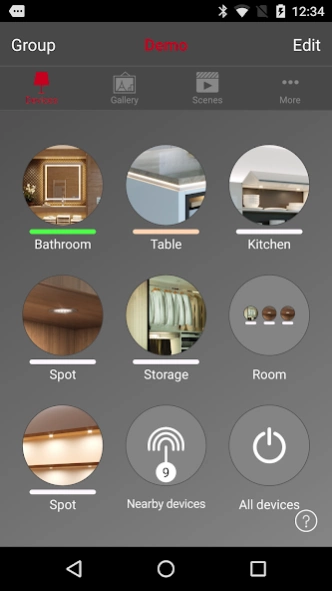
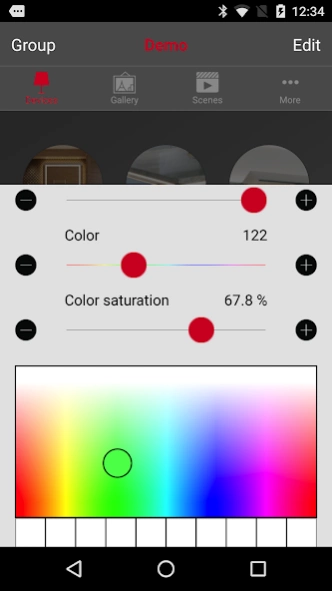
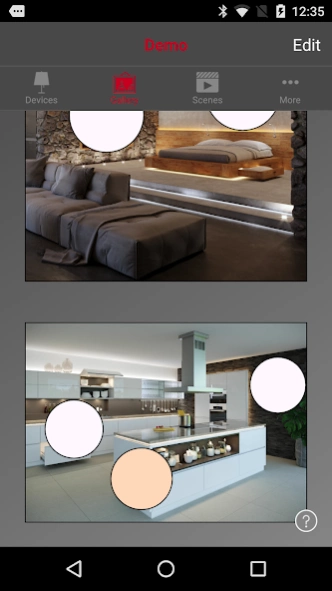
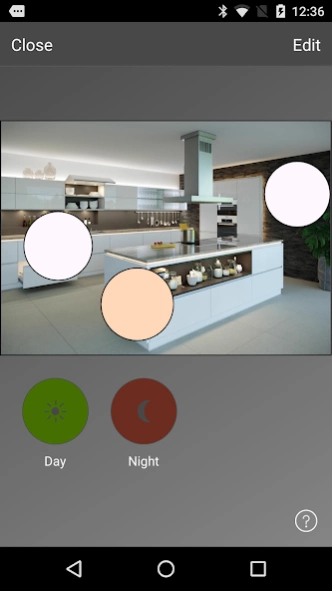
With Häfele Connect you can control the Loox LED lighting system.
With Häfele Connect you can use your android smartphone or tablet to control all components of the Loox LED lighting system and many other functional fittings in your Smart Home that are controllable via Bluetooth through Connect BLE boxes.
The Häfele Connect app offers extensive control options, including the control of electric fittings in furniture and rooms.
The Häfele Connect functions in detail:
- On/off switching and dimming of lights.
- On/off switching and dimming of multi white lights, setting of colour temperature.
- On/off switching and dimming of RGB lights, setting of light colour.
- Pre-setting of individual light scenarios for various occasions.
- On/off switching of sound.
- Control of TV lifts, electric sliding doors or other electric drives from the Häfele range.
- Individual or group applications with various scenarios and areas.
Setting up the app takes no time at all – it is easy and intuitive with just one click.
Special features:
Everything immediately within reach:
With the Häfele Connect app you can control all of your lights and electric fittings at a glance, individually or in groups. For example, create a group for the kitchen, the office or shop lighting and conveniently turn all lights in the group on and off. When your living room turns into a home cinema, dim all the lights with just one click.
Ingenious photo control:
With the Gallery, the Häfele Connect app provides intuitive light control of the highest quality. Take a photo of your rooms, mark the lights in the photo and control the room’s atmosphere directly in the photo.
Retrievable scenes for all occasions:
Create individual scenes for various events that can be called up at any time. In these scenes, save the appropriate lighting and the position and function of your electronic fittings – for dinner, the workplace or a promotion in the shop, for example. Imagination knows no bounds.
Securely share your network with friends and colleagues:
The app offers four security levels for sharing your network in Häfele Connect with others. They can be set up in no time. All changes will be automatically synchronised on all devices in the shared networks via the Häfele Connect Cloud Service.
About Häfele Connect
The company that develops Häfele Connect is Häfele SE & Co KG. The latest version released by its developer is 3.7.5.
To install Häfele Connect on your Android device, just click the green Continue To App button above to start the installation process. The app is listed on our website since 2022-09-06 and was downloaded 0 times. We have already checked if the download link is safe, however for your own protection we recommend that you scan the downloaded app with your antivirus. Your antivirus may detect the Häfele Connect as malware as malware if the download link to casambi.hafele is broken.
How to install Häfele Connect on your Android device:
- Click on the Continue To App button on our website. This will redirect you to Google Play.
- Once the Häfele Connect is shown in the Google Play listing of your Android device, you can start its download and installation. Tap on the Install button located below the search bar and to the right of the app icon.
- A pop-up window with the permissions required by Häfele Connect will be shown. Click on Accept to continue the process.
- Häfele Connect will be downloaded onto your device, displaying a progress. Once the download completes, the installation will start and you'll get a notification after the installation is finished.
Program Details
System requirements
Download information
Pricing
Version History
version 3.7.5
posted on 2022-09-06
Bug fixes
version 3.6 prod 1
posted on 2022-04-08
Feature updates and bug fixes
- "Absence timeout" parameter for Presence/Absence sensor actions
- "Export changes of CCT" option for DALI gateway
- Support the extended set of D4i data points for DT50/51/52
- Identification of DALI Devices and Groups from Unit DALI details
- Password strength indicator added
- Support disabling of certain device parameters by instructions from fixture profile
- UI enhancements
Disclaimer
Official Google Play Link
We do not host Häfele Connect on our servers. We did not scan it for viruses, adware, spyware or other type of malware. This app is hosted by Google and passed their terms and conditions to be listed there. We recommend caution when installing it.
The Google Play link for Häfele Connect is provided to you by apps112.com without any warranties, representations or guarantees of any kind, so access it at your own risk.
If you have questions regarding this particular app contact the publisher directly. For questions about the functionalities of apps112.com contact us.
